
# openHAB Hue Emulation Service
Hue Emulation exposes openHAB items as Philips Hue lights to Hue API-compatible applications like Amazon Echos, Google Homes, or any other Hue-compatible application.
Because Amazon Echo and Google Home communicate with openHAB locally via the Hue API, this provides a fast and reliable way to control your installation using voice commands. See the Troubleshooting section below though.
This service is independent of the also available Hue binding!
Currently the following Hue functionality is supported:
- Lights: Exposed from openHAB items
- Groups / Rooms: Derived from openHAB groups or semantic locations
- Scenes: Maps to rules that are tagged with
scene - Rules: Maps to rules that are tagged with
hueemulation_rule - Schedules: Maps to rules that are tagged with
hueemulation_schedule
You can create, modify, and remove groups, rooms, scenes, rules, and schedules from within Hue-compatible devices and apps.
# Mapping models
Hue Emulation can expose items in two different ways:
- Classic item-based mapping (default)
- Semantic model-based mapping (optional, recommended)
The selected model affects how lights and rooms are derived. Only one mapping model is active at a time.
# Semantic model mapping
When semantic model mapping is enabled, Hue Emulation derives lights and rooms from openHAB’s semantic model instead of relying on item types and tags.
This allows Hue-compatible apps to discover a structure that closely matches a real Philips Hue bridge:
- Lights are derived from semantic LightSource equipment
- Rooms are derived from semantic Location groups
- Light capabilities are inferred from semantic points
# Lights
A Hue light is created for each semantic LightSource equipment.
Each LightSource may expose one or more Hue lights, depending on its members:
- Switch → On/Off light
- Dimmer → Dimmable light
- Color → Color light
Only items that are:
- members of a semantic LightSource equipment
- tagged with appropriate semantic Point and Property tags
are considered when deriving Hue lights.
The required semantic tags for each light type are:
- On/Off lights (Switch items): Point tag Switch, Property tag Power
- Dimmable lights (Dimmer items): Point tag Control, Property tag Brightness
- Color lights (Color items): Point tag Control, Property tag Color
Renaming a light will change the label of the LightSource equipment.
# Rooms (Hue groups)
If a LightSource is located inside a semantic Location group, that location is exposed as a Hue room.
Rooms are optional:
- If no semantic Location exists, lights are still exposed
- Lights without a Location simply appear without a room assignment
# Mixed light types in rooms
If a room contains different kinds of lights (for example switches and color lights), the room exposes the lowest common denominator of supported features.
This matches the behavior of a real Hue bridge:
- Commands are broadcast to all lights
- Each light applies only what it supports
- Unsupported attributes are silently ignored
This means, for example, that setting a color on a mixed room will only affect color-capable lights. Individual lights always retain their full capabilities.
# Discovery
As soon as the service is enabled, it will announce the presence of an (emulated) Hue bridge of the second generation (square bridge). Hue bridges are using the Universal Plug and Play (UPnP) protocol for discovery.
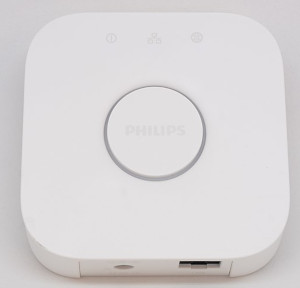
Like the real Hue bridge the service must be put into pairing mode before other applications can access it. By default the pairing mode disables itself after 1 minute (can be configured).
# Classic Mapping
# Exposed Lights
This section applies only when semantic model mapping is disabled.
It is important to note that you are exposing Items, not Things or Channels. Only Color, Dimmer, Rollershutter, Switch, and Group type Items are supported. Group type Items require the "Huelight" tag to be exposed as devices instead of groups.
This service can emulate three different devices:
- An OSRAM SMART+ Plug
- A dimmable white color Philips A19 bulb
- A Philips Gen 3 LCT010 extended color bulb
The exposed Hue type depends on some criteria:
- If the Item has the category "ColorLight": It will be exposed as a color bulb.
- If the Item has the category "Light": It will be exposed as a switch.
This initial type determination is overridden if the Item is tagged.
The following default tags are set up:
- "Switchable": Item will be exposed as an OSRAM SMART+ Plug.
- "Lighting": Item will be exposed as a dimmable white bulb.
- "ColorLighting": Item will be exposed as a color bulb.
It is the responsibility of binding developers to categorize and default-tag their available Channels so that linked Items are automatically exposed with this service.
You can tag Items manually as well.
# Exposed names
This section applies only when semantic model mapping is disabled.
Your Item labels are exposed. The default naming schema for automatically linked items unfortunately names Items like their channel names, so usually "Brightness" or "Color". You will want to rename those.
# Migrating from classic mapping
Existing setups continue to work unchanged.
To migrate to the semantic model:
- Define semantic LightSource equipment
- Assign control points (Switch, Dimmer, Color)
- Optionally place equipment inside Location groups
- Enable
useSemanticModel
# Configuration
All options are available in the graphical interface and via textual configuration.
Semantic model mapping can be enabled via configuration:
org.openhab.hueemulation:useSemanticModel=true
Pairing can be turned on and off:
org.openhab.hueemulation:pairingEnabled=false
You can define a pairing timeout in seconds.
After that timeout, the pairingEnabled is automatically set to false.
org.openhab.hueemulation:pairingTimeout=60
Enable the following option in combination with pairing to create a new API key on the fly on every API endpoint, not only via the new-user-create API.
Necessary for Amazon Echos and other devices where the API key cannot be reset. After a new installation of openHAB or a configuration pruning, the old API keys are gone, but Amazon Echos will keep trying with their old, invalid keys.
org.openhab.hueemulation:createNewUserOnEveryEndpoint=false
Some Amazon Echo versions only allow V1 Hue bridges (the round ones, not the square ones) to be discovered. If the following option is enabled in combination with the pairing mode, the service will pretend to be an old Hue bridge.
This option resets automatically after pairing mode has been switched off by the timeout.
org.openhab.hueemulation:temporarilyEmulateV1bridge=false
Permanent V1 bridge emulation (no obvious reason to enable that):
org.openhab.hueemulation:permanentV1bridge=false
The Hue emulation service will announce its existence via UPnP on every openHAB-configured primary address (IPv4 and IPv6).
Usually, you do not want to set this option but change the primary address configuration of openHAB.
This option allows you to override what addresses are used for the announcement. You can have multiple comma-separated entries.
org.openhab.hueemulation:discoveryIp=192.168.1.100,::FFFF:A9DB:0D85
The Hue emulation service supports three types of emulated bulbs. You need to tell the service which Item tag corresponds to which emulated bulb type. One of the comma-separated tags must match for the item to be exposed. Can be empty to match an Item based on other criteria.
org.openhab.hueemulation:restrictToTagsSwitches=Switchable
org.openhab.hueemulation:restrictToTagsWhiteLights=Lighting
org.openhab.hueemulation:restrictToTagsColorLights=ColorLighting
The above default assignment means that every item that has the tag "Switchable" will be emulated as a Zigbee Switch. If you want your switches to be exposed as lights instead (because your Amazon Echo does not support switches for example), you want to have:
org.openhab.hueemulation:restrictToTagsSwitches=NONE
org.openhab.hueemulation:restrictToTagsWhiteLights=Lighting,Switchable
org.openhab.hueemulation:restrictToTagsColorLights=ColorLighting
The service tries to expose as many Items as possible (greedy), based on some criteria as explained in the section above. If you want to exclude Items, you need to tag them. Define the tags with the following option:
org.openhab.hueemulation:ignoreItemsWithTags=internal
The default is to not expose any items that have the "internal" tag assigned. You want this tag for all items that are purely used for rules, as proxy items etc.
# Troubleshooting
Some devices like Amazon Echo, Google Home, and all Philips devices (TVs, apps) expect a Hue bridge to run on port 80. You must either:
Port forward your openHAB installation to port 80 (
iptables -t nat -A PREROUTING -p tcp -m tcp --dport 80 -j REDIRECT --to-ports 8080)Install a reverse proxy on port 80, for example, nginx with the following configuration:
server {
  listen 80;
  location / {
    proxy_pass                              http://localhost:8080/;
    proxy_set_header Host                   $http_host;
    proxy_set_header X-Real-IP              $remote_addr;
    proxy_set_header X-Forwarded-For        $proxy_add_x_forwarded_for;
    proxy_set_header X-Forwarded-Proto      $scheme;
  }
}
Or let openHAB run on port 80 (the entire Java process requires elevated privileges).
For Amazon Echo, the pairing process may fail due to a 302 response from openHAB. This can be resolved by using a reverse proxy to change the request URL from
/apito/api/, for example, nginx with the following configuration:server { listen 80; location /api { proxy_pass http://localhost:8080/api/; } }
Please open port 80 TCP and port 1900 UDP in your firewall installation.
You can test if the Hue emulation does its job by enabling pairing mode, including the option "Amazon Echo device discovery fix".
- Navigate with your browser to
http://your-openhab-ip/description.xmlto check the discovery response. Check the IP address in there. - Navigate with your browser to
http://your-openhab-ip/api/statusto check the self test report.
If you use the port forwarding way, the self-test page will not be able to correctly determine if your installation works on port 80. A reverse proxy is recommended.
Depending on the firmware version of your Amazon Echo, it may not support colored bulbs or switches.
Please assign "ColorLighting" and "Switchable" to the WhiteLights type as explained above.
Also note that Amazon Echos can be stubborn. You might need to remove all formerly recognized devices multiple times and perform the search via different Echos and also via the web or mobile application.
It might help to (temporarily) lower the emulated bridge version in the configuration as described above.
# Text Configuration Example
# Semantic model mapping
The following example shows a semantic model where Locations become Hue rooms and LightSource equipment becomes Hue lights.
// Locations (Rooms)
Group Kitchen    "Kitchen"     ["Kitchen"]
Group FamilyRoom "Family room" ["FamilyRoom"]
Group Office     "Office"      ["Office"]

// LightSource equipment
Group KitchenSpots     "Kitchen spots"      (Kitchen)    ["Lightbulb"]
Group DinnerTableLamp  "Dinner table"       (FamilyRoom) ["Pendant"]
Group GamingLightStrip "Gaming light strip" (Office)     ["LightStrip"]

// Control points
Switch  TestSwitch     "Switch"     (KitchenSpots)     ["Switch", "Power"]       {channel="..."}
Dimmer  TestDimmer     "Brightness" (DinnerTableLamp)  ["Control", "Brightness"] {channel="..."}
Color   TestColor      "Color"      (GamingLightStrip) ["Control", "Color"]      {channel="..."}
# Classic mapping
The item label will be used as the Hue device name. Please be aware that textually defined items are generally a bad idea. In this case, renaming items in Hue-compatible apps will fail.
Switch  TestSwitch     "Kitchen spots"      [ "Switchable" ]    {channel="..."}
Dimmer  TestDimmer     "Dinner table"       [ "Lighting" ]      {channel="..."}
Color   TestColor      "Gaming light strip" [ "ColorLighting" ] {channel="..."}