

AVM FRITZ! Binding

The binding integrates AVM FRITZ!Boxes with a special focus on the AHA (AVM Home Automation) features.
Supported Things
FRITZ!Box
FRITZ!Boxes (thing type fritzbox) are supported as bridges and they offer channels for call monitoring. To activate the call monitor interface on a FRITZ!Box, you need to dial once #96*5* on a connected telephone. You should hear a short audio signal as confirmation. This procedure opens TCP/IP port 1012 on your FRITZ!Box. (It can be deactivated again by dialing #96*4*.) You can test if everything is working with the Telnet program from your openHAB server:
telnet fritz.box 1012If you see an output like this:
Trying 192.168.178.1...
Connected to fritz.box.
Escape character is '^]'.
then it successfully connected to the call monitor. If not, please make sure that the target openHAB system does not block the port on its firewall.
Additionally, they serve as a bridge for accessing other AHA devices. For AHA functionality, the router has to run at least on firmware FRITZ!OS 6.00 and it has to support the "Smart Home" service.
NOTE
FRITZ!DECT is now called FRITZ!Smart e.g. FRITZ!DECT 200 is now called FRITZ!Smart Energy 200 or FRITZ!DECT 302 is now called FRITZ!Smart Thermo 302. Otherwise, everything will remain typically FRITZ!. FRITZ!Smart contains FRITZ!DECT's convenience, sophisticated technology, and familiar ease of use. In terms of technology, the FRITZ!Smart products are identical with FRITZ!DECT.
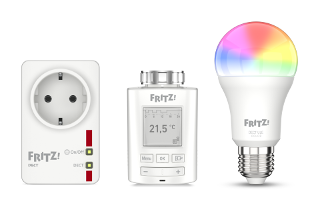
FRITZ!DECT 200 / FRITZ!DECT 210
This switchable outlets FRITZ!DECT 210 and FRITZ!DECT 200 have to be connected to a FRITZ!Box by DECT protocol. They support switching the outlet and reading the current power, current voltage, accumulated energy consumption and temperature. NOTE: The voltage channel will be added to the thing during runtime - if the interface supports it (FRITZ!OS 7 or higher).
FRITZ!Smart Energy 250
This smart meter read head FRITZ!Smart Energy 250 has to be connected to a FRITZ!Box by DECT protocol. It supports reading the current power, current voltage, accumulated energy consumption, as well as battery level and battery low indication.
FRITZ!DECT Repeater 100
This DECT repeater has to be connected to a FRITZ!Box by DECT protocol. It only supports temperature readings.
FRITZ!Powerline 546E
This powerline adapter can be used via the bridge or in stand-alone mode. It supports switching the outlet and reading the current power, current voltage and accumulated energy consumption. This device does not contain a temperature sensor. NOTE: The voltage channel will be added to the thing during runtime - if the interface supports it (FRITZ!OS 7 or higher).
FRITZ!DECT 302 / FRITZ!DECT 301 / FRITZ!DECT 300 / Comet DECT
These devices FRITZ!DECT 302, FRITZ!DECT 301, FRITZ!DECT 300 and Comet DECT (EUROtronic Technology GmbH) are used to regulate radiators via DECT-ULE protocol. The FRITZ!Box can handle up to twelve heating thermostats. The binding provides channels for reading and setting the temperature. Additionally you can check the eco temperature, the comfort temperature and the battery level of the device. The FRITZ!Box has to run at least on firmware FRITZ!OS 6.35. NOTE: The battery_level channel will be added to the thing during runtime - if the interface supports it (FRITZ!OS 7 or higher).
FRITZ!DECT 400 / FRITZ!DECT 440
The FRITZ!DECT 440 and FRITZ!DECT 400 are buttons for convenient operation of FRITZ! Smart Home devices (FRITZ!OS 7.08 or higher for FRITZ!DECT 400, 7.20 or higher for FRITZ!DECT 440). The FRITZ!DECT 400 supports a configurable button to trigger short or long press events. Beside four customizable buttons the FRITZ!DECT 440 supports temperature readings. NOTE: FRITZ!DECT 440 now uses Channel Groups to group its Channels like device#battery_level, device#battery_low for device information, sensors#temperature for sensor data and top-left, bottom-left, top-right and bottom-right combined with press and last_change (see Full Example)
FRITZ!DECT 500
The FRITZ!DECT 500 is a dimmable colorized light bulb.
Supported Channel Groups
| Channel Group ID | Description | Available on thing |
|---|---|---|
device | Device information. | FRITZ!DECT 440 |
sensors | Sensor data. | FRITZ!DECT 440 |
top-left, bottom-left, top-right, bottom-right | Button and trigger. | FRITZ!DECT 440 |
DECT-ULE / HAN-FUN Devices
The following sensors have been successfully tested using FRITZ!OS 7 for FRITZ!Box 7490 / 7590:
- SmartHome Tür-/Fensterkontakt (optisch) - an optical door/window contact (thing type
HAN_FUN_CONTACT) - SmartHome Tür-/Fensterkontakt (magnetisch) - a magnetic door/window contact (thing type
HAN_FUN_CONTACT) - SmartHome Bewegungsmelder - a motion sensor (thing type
HAN_FUN_CONTACT) - SmartHome Rauchmelder - a smoke detector (thing type
HAN_FUN_CONTACT) - SmartHome Wandtaster - a switch with two buttons (thing type
HAN_FUN_SWITCH) - SmartHome Zwischenstecker innen - a switchable indoor outlet (thing type
HAN_FUN_ON_OFF) - SmartHome Zwischenstecker außen - a switchable outdoor outlet (thing type
HAN_FUN_ON_OFF) - Rollotron DECT 1213 - an electronic belt winder (thing type
HAN_FUN_BLINDS) - Becker BoxCTRL - a radio controlled roller shutter drive (thing type
HAN_FUN_BLINDS) - SmartHome LED-Lampe E27 (farbig) - a dimmable colorized light bulb (thing type
HAN_FUN_COLOR_BULB) - SmartHome LED-Lampe E27 (warmweiß) - a dimmable light bulb (thing type
HAN_FUN_DIMMABLE_BULB)
The use of other Sensors should be possible, if these are compatible with DECT-ULE / HAN-FUN standards.
The FRITZ!Box has to run at least on firmware FRITZ!OS 7.
FRITZ! Groups
The FRITZ!OS supports three different types of groups. On the one hand there are groups for heating thermostats on the other hand there are groups for switchable outlets and power meters, a third group supports control of roller shutters and blinds. The first one provides the same channels and actions like the FRITZ!DECT 302 / FRITZ!DECT 301 / FRITZ!DECT 300 / Comet DECT devices. The latter provides the same channels like the FRITZ!DECT 200 / FRITZ!DECT 210 / FRITZ!Powerline 546E devices. A blind group provides the rollershutter channel similar to a HAN_FUN_BLINDS thing (e.g. Becker BoxCTRL). The FRITZ!Box has to run at least on firmware FRITZ!OS 6.69.
Discovery
The FRITZ!Box and the powerline adapter are discovered through UPnP in the local network. When added as things, a username/password has eventually to be set depending on your Box/Powerline security configuration. The credentials given in the settings must have HomeAuto permissions. This implies to enable "login to the home network with user name and password" setting in the FRITZ!Box. To do so
- Click "System" in the FRITZ!Box user interface.
- Click "FRITZ!Box Users" in the "System" menu.
- Click on the "Login to the Home Network" tab.
- Enable the option "Login with FRITZ!Box user name and password".
- Click "Apply" to save the settings.
NOTE: Now you can only log in to the FRITZ!Box with a user account, i.e. after entering a user name and password.
Auto-discovery is enabled by default. To disable it, you can add the following line to <openHAB-conf>/services/runtime.cfg:
discovery.avmfritz:background=falseIf correct credentials are set in the bridge configuration, connected AHA devices are discovered automatically (may last up to 3 minutes).
Thing Configuration
FRITZ!Box
ipAddress(mandatory), default "fritz.box"protocol(optional, "http" or "https"), default "http"port(optional, 1 to 65535), no default (derived from protocol: 80 or 443)password(optional for call monitoring, but mandatory for AHA features), no default (depends on FRITZ!Box security configuration)user(optional), no default (depends on FRITZ!Box security configuration)pollingInterval(optional, 1 to 60), default 15 (in seconds)asyncTimeout(optional, 1000 to 60000), default 10000 (in milliseconds)syncTimeout(optional, 500 to 15000), default 2000 (in milliseconds)
FRITZ!Powerline 546E
ain(optional, advanced), no default (AIN number of the device)ipAddress(mandatory), default "fritz.powerline"protocol(optional, "http" or "https"), default "http"port(optional, 1 to 65535), no default (derived from protocol: 80 or 443)password(optional), no default (depends on FRITZ!Powerline security configuration)pollingInterval(optional, 1 to 60), default 15 (in seconds)asyncTimeout(optional, 1000 to 60000), default 10000 (in milliseconds)syncTimeout(optional, 500 to 15000), default 2000 (in milliseconds)
If the FRITZ!Powerline 546E is added via auto-discovery it determines its own ain, otherwise you have to configure it manually.
Things Connected To FRITZ!Box Or FRITZ!Powerline 546E
ain(mandatory), no default (AIN number of the device)
Finding The AIN
The AIN (actor identification number) can be found in the FRITZ!Box interface -> Home Network -> SmartHome. When opening the details view for a device with the edit button, the AIN is shown. Use the AIN without the blank.
Supported Channels
| Channel Type ID | Item Type | Description | Available on thing |
|---|---|---|---|
| incoming_call | Call | Details about incoming call. %2$s contains the external, calling number, %1$s is the internal, receiving number. | FRITZ!Box |
| outgoing_call | Call | Details about outgoing call. %1$s contains the external, called number, %2$s is the internal, calling number. | FRITZ!Box |
| active_call | Call | Details about active call. %1$s contains the external, calling number, %2$s is empty. | FRITZ!Box |
| call_state | String | Details about current call state, either IDLE, RINGING, DIALING or ACTIVE. | FRITZ!Box |
| apply_template | String | Apply template for device(s) (channel's state options contains available templates, for an alternative way see the description below) - FRITZ!OS 7 | FRITZ!Box, FRITZ!Powerline 546E |
| mode | String | States the mode of the device (MANUAL/AUTOMATIC/VACATION) | FRITZ!DECT 210, FRITZ!DECT 200, FRITZ!Powerline 546E, FRITZ!DECT 30x, Comet DECT |
| locked | Contact | Device is locked for switching over external sources (OPEN/CLOSE) | FRITZ!DECT 210, FRITZ!DECT 200, FRITZ!Powerline 546E, FRITZ!DECT 30x, Comet DECT |
| device_locked | Contact | Device is locked for switching manually (OPEN/CLOSE) - FRITZ!OS 6.90 | FRITZ!DECT 210, FRITZ!DECT 200, FRITZ!Powerline 546E, FRITZ!DECT 30x, Comet DECT |
| temperature | Number:Temperature | Current measured temperature | FRITZ!DECT 210, FRITZ!DECT 200, FRITZ!DECT Repeater 100, FRITZ!DECT 30x, Comet DECT, FRITZ!DECT 440 |
| humidity | Number:Dimensionless | Current measured humidity - FRITZ!OS 7.24 | FRITZ!DECT 440 |
| energy | Number:Energy | Accumulated energy consumption | FRITZ!DECT 210, FRITZ!DECT 200, FRITZ!Powerline 546E, FRITZ!Smart Energy 250 |
| power | Number:Power | Current power consumption | FRITZ!DECT 210, FRITZ!DECT 200, FRITZ!Powerline 546E, FRITZ!Smart Energy 250 |
| voltage | Number:ElectricPotential | Current voltage - FRITZ!OS 7 | FRITZ!DECT 210, FRITZ!DECT 200, FRITZ!Powerline 546E, FRITZ!Smart Energy 250 |
| outlet | Switch | Switchable outlet (ON/OFF) | FRITZ!DECT 210, FRITZ!DECT 200, FRITZ!Powerline 546E |
| on_off | Switch | Switchable device (ON/OFF) | HAN_FUN_ON_OFF |
| brightness | Dimmer | Dimmable lights | HAN_FUN_DIMMABLE_BULB |
| color | Color | Color lights | FRITZ!DECT 500, HAN_FUN_COLOR_BULB |
| color_temperature | Dimmer | Color temperature of lights in white mode | FRITZ!DECT 500, HAN_FUN_COLOR_BULB |
| color_temperature_abs | Number:Temperature | Color temperature of lights in white mode in Kelvin Advanced | FRITZ!DECT 500, HAN_FUN_COLOR_BULB |
| actual_temp | Number:Temperature | Current temperature of heating thermostat | FRITZ!DECT 30x, Comet DECT |
| set_temp | Number:Temperature | Set Temperature of heating thermostat | FRITZ!DECT 30x, Comet DECT |
| eco_temp | Number:Temperature | Eco Temperature of heating thermostat | FRITZ!DECT 30x, Comet DECT |
| comfort_temp | Number:Temperature | Comfort Temperature of heating thermostat | FRITZ!DECT 30x, Comet DECT |
| radiator_mode | String | Mode of heating thermostat (ON/OFF/COMFORT/ECO/BOOST/WINDOW_OPEN) | FRITZ!DECT 30x, Comet DECT |
| next_change | DateTime | Next change of the Set Temperature if scheduler is activated in the FRITZ!Box settings - FRITZ!OS 6.80 | FRITZ!DECT 30x, Comet DECT |
| next_temp | Number:Temperature | Next Set Temperature if scheduler is activated in the FRITZ!Box settings - FRITZ!OS 6.80 | FRITZ!DECT 30x, Comet DECT |
| battery_level | Number | Battery level (in %) - FRITZ!OS 7 | FRITZ!DECT 30x, Comet DECT, FRITZ!DECT 400, FRITZ!DECT 440, FRITZ!Smart Energy 250 |
| battery_low | Switch | Battery level low (ON/OFF) - FRITZ!OS 6.80 | FRITZ!DECT 30x, Comet DECT, FRITZ!DECT 400, FRITZ!DECT 440, FRITZ!Smart Energy 250 |
| contact_state | Contact | Contact state information (OPEN/CLOSED). | HAN-FUN contact (e.g. SmartHome Tür-/Fensterkontakt or SmartHome Bewegungsmelder)- FRITZ!OS 7 |
| last_change | DateTime | States the last time the button was pressed. | FRITZ!DECT 400, FRITZ!DECT 440, HAN-FUN switch (e.g. SmartHome Wandtaster) - FRITZ!OS 7 |
| rollershutter | Rollershutter | Rollershutter control and status. Accepts UP/DOWN/STOP commands and the opening level in percent. States the opening level in percent. | HAN-FUN blind (e.g. Rolltron DECT 1213) - FRITZ!OS 7 |
| obstruction_alarm | Obstruction Alarm | Rollershutter obstruction alarm (ON/OFF) | HAN-FUN blind (e.g. Rolltron DECT 1213) - FRITZ!OS 7 |
| temperature_alarm | Temperature Alarm | Rollershutter temperature alarm (ON/OFF) | HAN-FUN blind (e.g. Rolltron DECT 1213) - FRITZ!OS 7 |
Triggers
| Channel Type ID | Item Type | Description | Available on thing |
|---|---|---|---|
| press | Trigger | Dispatches a PRESSED event when a button is pressed. | FRITZ!DECT440, HAN-FUN switch (e.g. SmartHome Wandtaster) |
| press | Trigger | Dispatches a SHORT_PRESSED or LONG_PRESSED event when a button is pressed. | FRITZ!DECT 400 |
The trigger channel press for a FRITZ!DECT 440 device or HAN-FUN switch is of type system.rawbutton to allow the usage of the rawbutton-toggle-switch profile. The trigger channel press for a FRITZ!DECT 400 device is of type system.button.
FRITZ! Smart Home Templates
With the new templates feature in FRITZ!OS 7, you can now save the settings of your Smart Home devices and groups as a template for certain occasions e.g. holidays or vacation. Unfortunately it is not that simple to find out the unique identifier (AIN) for a template needed for sending it as command to the apply_template channel. Here is a work-around: To retrieve the list of AINs assigned by FRITZ! for your templates, go to the FRITZ!Box' Support page at http://fritz.box/html/support.html within your local network and login. Then in the section "Support Data" ("Support-Daten") press the button "Create Support Data" ("Support-Daten erstellen") and save the generated text file. Open the file in a text editor and search for the term "avm_home_device_type_template". You will find entries like the attached one. The identifyer 'tmpFC0F2C-3960B7EE6' contains the templates AINs you need for using them in rules.
Name 'Demo Template', identifyer 'tmpFC0F2C-3960B7EE6', firmware version '0.1'
    [aktive] ID 60013, emc 0x0, model 0x0, grouphash=0x0, devicetype 'avm_home_device_type_template', functionbitmask 0x4000, sortid 0, batt perc 255 low 255, pollinterval 0, polltimeout 0, validchangetime: 0
    --------------------
templates.rules
rule "Apply template"
when
    ...
then
    ApplyTemplate.sendCommand("tmpFC0F2C-3960B7EE6")
end
Actions
For heating devices and heating groups there are two actions available to set Boost or Window Open mode for a given duration: setBoostMode(long) and setWindowOpenMode(long). The duration has to be given in seconds, min. 1, max. 86400, 0 for deactivation.
val actions = getActions("avmfritz","avmfritz:Comet_DECT:1:aaaaaabbbbbb")

// set Boost mode for 5 min
actions.setBoostMode(300)
For power meter devices like FRITZ!DECT 200 or FRITZ!Smart Energy 250 there are actions to enable / disable high refresh polling: enablePowerMeterHighRefresh(long) and disablePowerMeterHighRefresh(). In general DECT devices submit their values every two minutes. Whenever a user visits the detail page of a device in FRITZ!OS the values are requested more often - every ten seconds. This action forces the high refresh interval of values by calling the related function on the FRITZ!Box interface.
Full Example
demo.things:
Bridge avmfritz:fritzbox:1 "FRITZ!Box" [ ipAddress="192.168.x.x", password="xxx", user="xxx" ] {
    Thing FRITZ_DECT_440 vvvvvvvvvvvv "FRITZ!DECT 440 #15" [ ain="vvvvvvvvvvvv" ]
    Thing FRITZ_DECT_200 xxxxxxxxxxxx "FRITZ!DECT 200 #1" [ ain="xxxxxxxxxxxx" ]
    Thing FRITZ_Powerline_546E yy_yy_yy_yy_yy_yy "FRITZ!Powerline 546E #2" [ ain="yy:yy:yy:yy:yy:yy" ]
    Thing Comet_DECT aaaaaabbbbbb "Comet DECT #3" [ ain="aaaaaabbbbbb" ]
    Thing HAN_FUN_CONTACT zzzzzzzzzzzz_1 "HAN-FUN Contact #4" [ ain="zzzzzzzzzzzz-1" ]
    Thing HAN_FUN_SWITCH zzzzzzzzzzzz_2 "HAN-FUN Switch #5" [ ain="zzzzzzzzzzzz-2" ]
    Thing FRITZ_DECT_Repeater_100 rrrrrrrrrrrr "DECT Repeater 100 #6" [ ain="rrrrrrrrrrrr" ]
    Thing FRITZ_GROUP_HEATING AA_AA_AA_900 "Heating group" [ ain="AA:AA:AA-900" ]
    Thing FRITZ_GROUP_SWITCH BB_BB_BB_900 "Switch group" [ ain="BB:BB:BB-900" ]
}
demo.items:
String CallState     "Call State [%s]"               { channel="avmfritz:fritzbox:1:call_state" }
Call   IncomingCall  "Incoming call: [%1$s to %2$s]" { channel="avmfritz:fritzbox:1:incoming_call" }
Call   OutgoingCall  "Outgoing call: [%1$s to %2$s]" { channel="avmfritz:fritzbox:1:outgoing_call" }
Call   ActiveCall    "Call established [%1$s]"       { channel="avmfritz:fritzbox:1:active_call" }
String ApplyTemplate "Apply template"                { channel="avmfritz:fritzbox:1:apply_template" }

Number:Temperature SwitchTemperature "Current measured temperature [%.1f %unit%]" { channel="avmfritz:FRITZ_DECT_440:1:vvvvvvvvvvvv:sensors#temperature" }
Number SwitchBatteryLevel "Battery level" { channel="avmfritz:FRITZ_DECT_440:1:vvvvvvvvvvvv:device#battery_level" }
Switch SwitchBatteryLow "Battery low" { channel="avmfritz:FRITZ_DECT_440:1:vvvvvvvvvvvv:device#battery_low" }
DateTime TopLeftSwitchLastChanged "Last change" { channel="avmfritz:FRITZ_DECT_440:1:vvvvvvvvvvvv:top-left#last_change" }
DateTime BottomLeftSwitchLastChanged "Last change" { channel="avmfritz:FRITZ_DECT_440:1:vvvvvvvvvvvv:bottom-left#last_change" }
DateTime TopRightSwitchLastChanged "Last change" { channel="avmfritz:FRITZ_DECT_440:1:vvvvvvvvvvvv:top-right#last_change" }
DateTime BottomRightSwitchLastChanged "Last change" { channel="avmfritz:FRITZ_DECT_440:1:vvvvvvvvvvvv:bottom-right#last_change" }

Switch Outlet1 "Switchable outlet" { channel="avmfritz:FRITZ_DECT_200:1:xxxxxxxxxxxx:outlet" }
Number:Temperature Temperature1 "Current measured temperature [%.1f %unit%]" { channel="avmfritz:FRITZ_DECT_200:1:xxxxxxxxxxxx:temperature" }
Number:Energy Energy1 "Accumulated energy consumption [%.3f kWh]" { channel="avmfritz:FRITZ_DECT_200:1:xxxxxxxxxxxx:energy" }
Number:Power Power1 "Current power consumption [%.2f %unit%]" { channel="avmfritz:FRITZ_DECT_200:1:xxxxxxxxxxxx:power" }
Number:ElectricPotential Voltage1 "Current voltage [%.1f %unit%]" { channel="avmfritz:FRITZ_DECT_200:1:xxxxxxxxxxxx:voltage" }

Switch Outlet2 "Switchable outlet" { channel="avmfritz:FRITZ_Powerline_546E:1:yy_yy_yy_yy_yy_yy:outlet" }

Number:Temperature COMETDECTTemperature "Current measured temperature [%.1f %unit%]" { channel="avmfritz:Comet_DECT:1:aaaaaabbbbbb:actual_temp" }
Number:Temperature COMETDECTSetTemperature "Thermostat temperature set point [%.1f %unit%]" { channel="avmfritz:Comet_DECT:1:aaaaaabbbbbb:set_temp" }
String COMETDECTRadiatorMode "Radiator mode [%s]" { channel="avmfritz:Comet_DECT:1:aaaaaabbbbbb:radiator_mode" }
Number COMETDECTBattery "Battery level" { channel="avmfritz:Comet_DECT:1:aaaaaabbbbbb:battery_level" }
Switch COMETDECTBatteryLow "Battery low" { channel="avmfritz:Comet_DECT:1:aaaaaabbbbbb:battery_low" }

Contact HANFUNContactState "Status [%s]" { channel="avmfritz:HAN_FUN_CONTACT:1:zzzzzzzzzzzz_1:contact_state" }

DateTime HANFUNSwitchLastChanged "Last change" { channel="avmfritz:HAN_FUN_SWITCH:1:zzzzzzzzzzzz_2:last_change" }

Number:Temperature Temperature1 "Current measured temperature [%.1f %unit%]" { channel="avmfritz:FRITZ_DECT_Repeater_100:1:rrrrrrrrrrrr:temperature" }

Number:Temperature FRITZ_GROUP_HEATINGSetTemperature "Group temperature set point [%.1f %unit%]" { channel="avmfritz:FRITZ_GROUP_HEATING:1:AA_AA_AA_900:set_temp" }

Switch Outlet3 "Group switch" { channel="avmfritz:FRITZ_GROUP_SWITCH:1:BB_BB_BB_900:outlet" }
demo.sitemap:
sitemap demo label="Main Menu" {

    Frame label="FRITZ!Box" {
        Text item=CallState
        Text item=IncomingCall
        Text item=OutgoingCall
        Text item=ActiveCall
        Selection item=ApplyTemplate
    }

    Frame label="FRITZ!DECT 200 switchable outlet" {
        Switch item=Outlet1 icon="poweroutlet"
        Text item=Temperature1 icon="temperature"
        Text item=Energy1 icon="energy"
        Text item=Power1 icon="energy"
        Text item=Voltage1 icon="energy"
    }

    Frame label="FRITZ!Powerline 546E switchable outlet" {
        Switch item=Outlet2 icon="poweroutlet"
    }

    Frame label="Comet DECT heating thermostat" {
        Text item=COMETDECTTemperature icon="temperature"
        Setpoint item=COMETDECTSetTemperature minValue=8.0 maxValue=28.0 step=0.5 icon="temperature"
        Selection item=COMETDECTRadiatorMode mappings=["ON"="ON", "OFF"="OFF", "COMFORT"="COMFORT", "ECO"="ECO", "BOOST"="BOOST"] icon="heating"
        Text item=COMETDECTBattery icon="battery"
        Switch item=COMETDECTBatteryLow icon="lowbattery"
    }

    Frame label="HAN-FUN Contact" {
        Text item=HANFUNContactState
    }

    Frame label="HAN-FUN Switch" {
        Text item=HANFUNSwitchLastChanged
    }
}
demo.rules:
rule "FRITZ!DECT 440 Top Left Button pressed"
when
    Channel "avmfritz:FRITZ_DECT_440:1:vvvvvvvvvvvv:top-left#press" triggered PRESSED
then
    logInfo("demo", "Top Left Button pressed")
endrule "HAN-FUN Button pressed"
when
Channel "avmfritz:HAN_FUN_SWITCH:1:zzzzzzzzzzzz_2:press" triggered
then
logInfo("demo", "Button pressed")
end