

Telegram Binding

The Telegram binding allows sending and receiving messages to and from Telegram clients (https://telegram.org), by using the Telegram Bot API.
Prerequisites
As described in the Telegram Bot API (https://core.telegram.org/bots#6-botfather), this is the manual procedure needed in order to get the necessary information.
Create a new Bot and get the Token
- On a Telegram client open a chat with BotFather.
- Send
/newbotto BotFather and fill in all the needed information. The authentication token that is given will be needed in the next steps. - The token is a combination with double point separated parts of numbers and letters e.g.: 158642643:ABCHL_O-MUovQ1NzrDF5R_nqLbFhPPrg9Jps
Create the destination chat
- Open a chat with your new Bot and send any message to it. The next step will not work unless you send a message to your bot first.
Get the chatID
- Open a browser and invoke
https://api.telegram.org/bot<token>/getUpdates(where<token>is the authentication token previously obtained e.g.:https://api.telegram.org/bot158642643:ABCHL_O-MUovQ1NzrDF5R_nqLbFhPPrg9Jps/getUpdates) - Look at the JSON result to find the value of
id: that's the chatID.
- Open a browser and invoke
Note that if using a Telegram group chat, the group chatIDs are prefixed with a dash that must be included in the config (e.g. -22334455). If this does not work for you (the JSON response may be empty), or you want to send to more than one recipient (= another chatID), the alternative is to contact (= open a chat with) a Telegram bot to respond with the chatID. There's a number of them such as @myidbot or @chatid_echo_bot - open a chat, eventually tap /start and it will return the chatID you're looking for. Another option is @getidsbot which gives you much more information. Note bots may work or not at any time so eventually you need to try another one.
Test the bot
- Open this URL in your web browser, replacing <token> with the authentication token and <chatId> with the chatId:
https://api.telegram.org/bot<token>/sendMessage?chat_id=<chatId>&text=testing- Your Telegram-bot should send you a message with the text:
testing
Notice: By default your bot will only receive messages that either start with the '/' symbol or mention the bot by username (or if you talk to it directly). However, if you add your bot to a group you must either talk to BotFather and send the command "/setprivacy" and then disable it or you give admin rights to your bot in that group. Otherwise you will not be able to receive those messages.
Supported Things
telegramBot - A Telegram Bot that can send and receive messages.
The Telegram binding supports the following state channels which originate from the last message sent to the Telegram bot:
- message text or URL
- message date
- full name of sender (first name + last name)
- username of sender
- chat id (used to identify the chat of the last message)
- reply id (used to identify an answer from a user of a previously sent message by the binding)
There are also event channels that provide received messages or query callback responses as JSON payloads for easier handling in rules.
Please note that the binding channels cannot be used to send messages. In order to send a message, an action must be used instead.
Thing Configuration
telegramBot parameters:
| Property | Default | Required | Description |
|---|---|---|---|
chatIds | Yes | A list of chatIds that are entered one per line in the UI, or are comma separated values when using textual config. | |
botToken | Yes | Authentication token that looks like 1122334455:AABBCCDDEEFFGG1122334455667788 | |
parseMode | None | No | Support for formatted messages, values: Markdown, MarkdownV2 or HTML. |
proxyHost | None | No | Proxy host for telegram binding. |
proxyPort | None | No | Proxy port for telegram binding. |
proxyType | SOCKS5 | No | Type of proxy server for telegram binding (SOCKS5 or HTTP). |
longPollingTime | 25 | No | Timespan in seconds for long polling the telegram API. (0 to disable) |
By default chat ids are bi-directionally, i.e. they can send and receive messages. They can be prefixed with an access modifier:
<restricts the chat to send only, i.e. this chat id can send messages to openHAB, but will never receive a notification.>restricts the chat to receive only, i.e. this chat id will receive all notifications, but messages from this chat id will be discarded.
To use the reply function, chat ids need to be bi-directional.
telegram.thing (no proxy):
Thing telegram:telegramBot:Telegram_Bot [ chatIds="ID", botToken="TOKEN" ]telegram.thing (multiple chat ids, one bi-directional chat (ID1), one outbound-only (ID2)):
Thing telegram:telegramBot:Telegram_Bot [ chatIds="ID1",">ID2", botToken="TOKEN" ]telegram.thing (markdown format):
Thing telegram:telegramBot:Telegram_Bot [ chatIds="ID", botToken="TOKEN", parseMode ="Markdown" ]telegram.thing (SOCKS5 proxy server is used):
Thing telegram:telegramBot:Telegram_Bot [ chatIds="ID", botToken="TOKEN", proxyHost="HOST", proxyPort="PORT", proxyType="TYPE" ]or HTTP proxy server
Thing telegram:telegramBot:Telegram_Bot [ chatIds="ID", botToken="TOKEN", proxyHost="localhost", proxyPort="8123", proxyType="HTTP" ]State Channels
| Channel Type ID | Item Type | Description |
|---|---|---|
| lastMessageText | String | The last received message |
| lastMessageURL | String | The URL of the last received message content |
| lastMessageDate | DateTime | The date of the last received message (UTC) |
| lastMessageName | String | The full name of the sender of the last received message |
| lastMessageUsername | String | The username of the sender of the last received message |
| chatId | String | The chat ID of the last received message |
| replyId | String | The reply ID passed to sendTelegram() for unambiguous assignment of user replies |
All channels are read-only. Either lastMessageText or lastMessageURL are populated for a given message. If the message did contain text, the content is written to lastMessageText. If the message did contain an audio, photo, video or voice, the URL to retrieve that content can be found in lastMessageURL.
Event Channels
messageEvent
When a message is received this channel will be triggered with a simplified version of the message data as the event, payload encoded as a JSON string. The following table shows the possible fields, any null values will be missing from the JSON payload.
| Field | Type | Description |
|---|---|---|
message_id | Long | Unique message ID in this chat |
from | String | First and/or last name of sender |
chat_id | Long | Unique chat ID |
text | String | Message text |
animation_url | String | URL to download animation from |
audio_url | String | URL to download audio from |
document_url | String | URL to download file from |
photo_url | Array | Array of URLs to download photos from |
sticker_url | String | URL to download sticker from |
video_url | String | URL to download video from |
video_note_url | String | URL to download video note from |
voice_url | String | URL to download voice clip from |
messageRawEvent
When a message is received this channel will be triggered with the raw message data as the event payload, encoded as a JSON string. See the Message class for details
callbackEvent
When a Callback Query response is received this channel will be triggered with a simplified version of the callback data as the event, payload encoded as a JSON string. The following table shows the possible fields, any null values will be missing from the JSON payload.
| Field | Type | Description |
|---|---|---|
message_id | Long | Unique message ID of the original Query message |
from | String | First and/or last name of sender |
chat_id | Long | Unique chat ID |
callback_id | String | Unique callback ID to send receipt confirmation to |
reply_id | String | Plain text name of original Query |
text | String | Selected response text from options give in original Query |
callbackRawEvent
When a Callback Query response is received this channel will be triggered with the raw callback data as the event payload, encoded as a JSON string. See the CallbackQuery class for details
Rule Actions
This binding includes a number of rule actions, which allow the sending of Telegram messages from within rules.
val telegramAction = getActions("telegram","telegram:telegramBot:<uid>")where uid is the Thing UID of the Telegram Thing (not the chat id!).
Once this action instance is retrieved, you can invoke the `sendTelegram' method on it:
telegramAction.sendTelegram("Hello world!")The following actions are supported. Each of the actions returns true on success or false on failure.
Actions to send messages to all configured chats
These actions will send a message to all chat ids configured for this bot.
| Action | Description |
|---|---|
| sendTelegram(String message) | Sends a message. |
| sendTelegram(String format, Object... args) | Sends a formatted message (See https://docs.oracle.com/en/java/javase/21/docs/api/java.base/java/util/Formatter.html for more information) |
| sendTelegramTo(Long[] chatIds, String message, Integer replyMessageId,Boolean silent, Integer messageThreadId, Object... args) | Sends a message with various options |
| sendTelegramQuery(String message, String replyId, String... buttons) | Sends a question to the user that can be answered via the defined buttons. The replyId can be freely choosen and is sent back with the answer. Then, the id is required to identify what question has been answered (e.g. in case of multiple open questions). The final result looks like this: 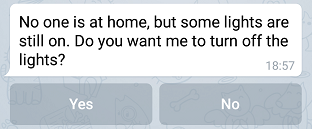 |
| sendTelegramAnswer(String replyId, String message) | Sends a message after the user has answered a question. You should always call this method after you received an answer. It will remove buttons from the specific question and will also stop the progress bar displayed at the client side. If no message is necessary, just pass null here. |
| deleteTelegramQuery(String replyId) | Deletes a question in the chat. The replyId must be the same as used for the corresponding sendTelegramQuery() action. |
| sendTelegramPhoto(String photoURL, String caption) | Sends a picture. Can be one of the URL formats, see the Note below, or a base64 encoded image (simple base64 data or data URI scheme). |
| sendTelegramPhoto(String photoURL, String caption, String username, String password) | Sends a picture which is downloaded from a username/password protected http/https address. |
| sendTelegramAnimation(String animationURL, String caption) | Send animation files either GIF or H.264/MPEG-4 AVC video without sound. |
| sendTelegramVideo(String videoURL, String caption) | Send MP4 video files up to 50MB. |
sendTelegramMediaGroup(List<String> mediaUrls, List<String> mediaTypes) | Sends a group of photos, videos, or other media as an album. mediaTypes must contain corresponding media types (photo, video, animation, audio, document) for each URL. Must contain 2-10 items. |
sendTelegramMediaGroup(Long chatId, List<String> mediaUrls, List<String> mediaTypes) | Sends a media group to a specific chat. See above for details. |
sendTelegramMediaGroup(Long chatId, List<String> mediaUrls, List<String> mediaTypes, Integer replyToMessageId, Boolean disableNotification, Integer messageThreadId) | Sends a media group with optional parameters: replyToMessageId (reply to a message), disableNotification (send silently), messageThreadId (for topics in supergroups). |
Note: In actions that require a file URL, the following formats are acceptable:
http://foo.com/bar.jpghttps://foo.com/bar.jpgfile://c:\\foo\\bar.jpgc:\\foo\\bar.jpg/etc/openhab/html/bar.jpg
Actions to send messages to a particular chat
Just put the chat id (must be a long value!) followed by an "L" as the first argument to one of the above mentioned APIs:
telegramAction.sendTelegram(1234567L, "Hello world!")Advanced Callback Query Response
This binding stores the callbackId and recalls it using the replyId, but this information is lost if openHAB restarts. If you store the callbackId, chatId, and optionally messageId somewhere that will be persisted when openHAB shuts down, you can use the following overload of sendTelegramAnswer to respond to any Callback Query.
telegramAction.sendTelegramAnswer(chatId, callbackId, messageId, message)Full Example
Send a text message to telegram chat
telegram.rules
rule "Send telegram with Fixed Message"
when
   Item Foo changed
then
   val telegramAction = getActions("telegram","telegram:telegramBot:2b155b22")
   telegramAction.sendTelegram("item Foo changed")
end
Send a text message with a formatted message
telegram.rules
rule "Send telegram with Formatted Message"
when
   Item Foo changed
then
   val telegramAction = getActions("telegram","telegram:telegramBot:2b155b22")
   telegramAction.sendTelegram("item Foo changed to %s and number is %.1f", Foo.state.toString, 23.56)
end
Send an image to telegram chat
http, https, and file are the only protocols allowed or a base64 encoded image.
telegram.rules
rule "Send telegram with image and caption from image accessible by url"
when
    Item Light_GF_Living_Table changed
then
    val telegramAction = getActions("telegram","telegram:telegramBot:2b155b22")
    telegramAction.sendTelegramPhoto("https://www.openhab.org/openhab-logo-top.png",
        "sent from openHAB")
end
telegram.rules
rule "Send telegram with image without caption from image accessible by url"
when
    Item Light_GF_Living_Table changed
then
    val telegramAction = getActions("telegram","telegram:telegramBot:2b155b22")
    telegramAction.sendTelegramPhoto("https://www.openhab.org/openhab-logo-top.png",
        null)
end
telegram.rules
rule "Send telegram with image from password protected http source"
when
    Item Light_GF_Living_Table changed
then
    val telegramAction = getActions("telegram","telegram:telegramBot:2b155b22")
    telegramAction.sendTelegramPhoto("http://192.168.1.5/doorcam/picture.jpg", "Door Camera", "user", "mypassword")
end
To send a base64 jpeg or png image:
telegram.rules
rule "Send telegram with base64 image and caption"
when
    Item Light_GF_Living_Table changed
then
    val telegramAction = getActions("telegram","telegram:telegramBot:2b155b22")
    // image as base64 string
    var String base64Image = "iVBORw0KGgoAAAANSUhEUgAAAEAAAABACAMAAACdt4HsAAAAS1BMVEUAAABAQEA9QUc7P0Y0OD88QEY+QUhmaW7c3N3w8PBlaG0+QUjb29w5PUU3O0G+vsigoas6P0WfoKo4O0I9QUdkZ2w9Qkg+QkkkSUnT3FKbAAAAGXRSTlMACJbx//CV9v//9pT/7Ur//+z/SfD2kpMHrnfDaAAAAGhJREFUeAHt1bUBAzAMRFGZmcL7LxpOalN5r/evLIlgGwBgXMhxSjP64sa6cdYH+hLWzYiKvqSbI4kQeEt5PlBealsMFIkAAgi8HNriOLcjduLTafWwBB9n3p8v/+Ma1Mxxvd4IAGCzB4xDPuBRkEZiAAAAAElFTkSuQmCC"
    telegramAction.sendTelegramPhoto(base64Image, "battery of motion sensor is empty")

    // image as base64 string in data URI scheme
    var String base64ImageDataURI = "data:image/png;base64,iVBORw0KGgoAAAANSUhEUgAAAEAAAABACAMAAACdt4HsAAAAS1BMVEUAAABAQEA9QUc7P0Y0OD88QEY+QUhmaW7c3N3w8PBlaG0+QUjb29w5PUU3O0G+vsigoas6P0WfoKo4O0I9QUdkZ2w9Qkg+QkkkSUnT3FKbAAAAGXRSTlMACJbx//CV9v//9pT/7Ur//+z/SfD2kpMHrnfDaAAAAGhJREFUeAHt1bUBAzAMRFGZmcL7LxpOalN5r/evLIlgGwBgXMhxSjP64sa6cdYH+hLWzYiKvqSbI4kQeEt5PlBealsMFIkAAgi8HNriOLcjduLTafWwBB9n3p8v/+Ma1Mxxvd4IAGCzB4xDPuBRkEZiAAAAAElFTkSuQmCC"
    telegramAction.sendTelegramPhoto(base64ImageDataURI, "battery of motion sensor is empty")
end
To send an image that resides on the local computer file system:
telegram.rules
rule "Send telegram with local image and caption"
when
    Item Light_GF_Living_Table changed
then
    val telegramAction = getActions("telegram","telegram:telegramBot:2b155b22")
    telegramAction.sendTelegramPhoto("file://C:/mypicture.jpg", "sent from openHAB")
end
To send an image based on an Image Item:
telegram.rules
rule "Send telegram with Image Item image and caption"
when
    Item Webcam_Image changed
then
    val telegramAction = getActions("telegram","telegram:telegramBot:2b155b22")
    telegramAction.sendTelegramPhoto(Webcam_Image.state.toFullString, "sent from openHAB")
end
To receive a message and react on that:
telegram.items
String telegramMessage "Telegram Message" { channel = "telegram:telegramBot:2b155b22:lastMessageText" }telegram.rules
rule "Receive telegram"
when
    Item telegramMessage received update "lights off"
then
    gLights.sendCommand(OFF)
end
To send a question with two alternatives and have the bot handle the reply:
telegram.items
String telegramReplyId "Telegram Reply Id" { channel = "telegram:telegramBot:2b155b22:replyId" }telegram.rules
rule "Send telegram with question"
when
    Item Presence changed to OFF
then
    val telegramAction = getActions("telegram","telegram:telegramBot:2b155b22")
    telegramAction.sendTelegramQuery("No one is at home, but some lights are still on. Do you want me to turn off the lights?", "Reply_Lights", "Yes", "No")
end


rule "Reply handler for lights"
when
    Item telegramReplyId received update Reply_Lights
then
    val telegramAction = getActions("telegram","telegram:telegramBot:2b155b22")

    if (telegramMessage.state.toString == "Yes")
    {
        gLights.sendCommand(OFF)
        telegramAction.sendTelegramAnswer(telegramReplyId.state.toString, "Ok, lights are *off* now.")
    }
    else
    {
        telegramAction.sendTelegramAnswer(telegramReplyId.state.toString, "Ok, I'll leave them *on*.")
    }
end